
The site nobody has opened in six months
You've probably seen this one. The WordPress site was delivered, it looked great, everyone celebrated. A year later the dashboard shows a long queue of pending updates, the contact form stopped sending email at some point nobody can pin down, and the host's warning about the PHP version went straight to the trash.
None of this shows up on the home page. The site is still online. The problem is underneath, and it grows quietly until the day it turns into a hack, a blank page, or a customer saying they sent a message and never heard back.
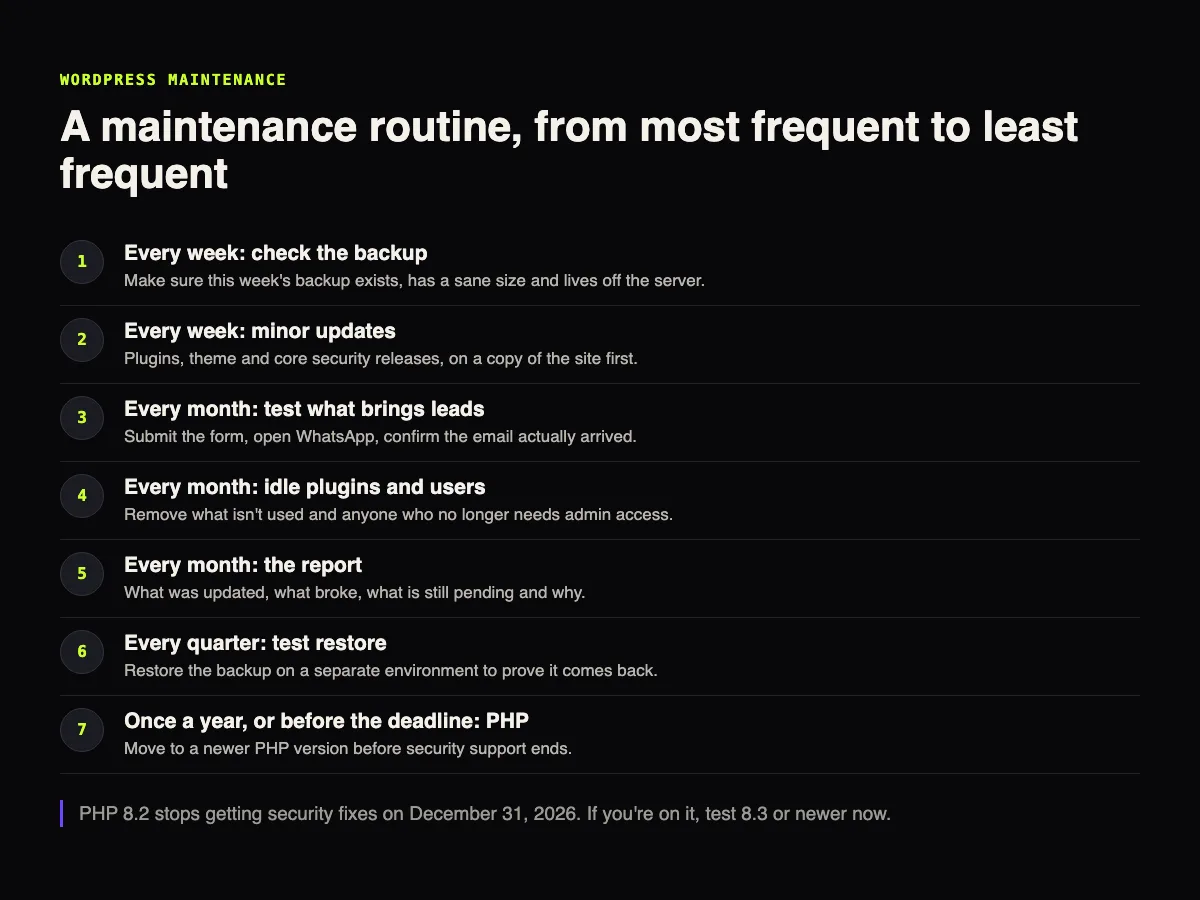
This is the WordPress maintenance routine I recommend, item by item, with a deadline that's coming up fast: PHP 8.2 loses security support on December 31, 2026. One honest caveat before we start: gusta.click itself doesn't run on WordPress, it's a static site. Our WordPress experience comes from client sites, like Vixting, which we look after with ongoing support.
Why WordPress needs a routine
WordPress is everywhere. According to W3Techs, on November 6, 2026 it ran 39.5% of all websites and 58.2% of the sites whose content management system is known. That's good news in a lot of ways: tons of plugins, plenty of people who know it, lots of documentation. It also means the people hunting for holes go where the sites are.
Patchstack's report on 2025 gives a sense of scale. They counted 11,334 new vulnerabilities in the WordPress ecosystem that year, 42% more than in 2024. Of those, 91% were in plugins and 9% in themes. WordPress core had just 6, all low priority. And 46% of the flaws had no fix from the developer by the time they were made public.
Two numbers from that report change how you should think about maintenance. First, the risk lives in plugins, not in WordPress itself. Second, for the most heavily exploited flaws, the median time to mass exploitation was 5 hours. Updating "when we get to it" can't keep up with that.
The deadline right now: PHP 8.2
WordPress runs on PHP, and every PHP version has an end date for fixes. The official PHP site says each branch gets two years of full support and two more years of critical security fixes only. After that, it's done.
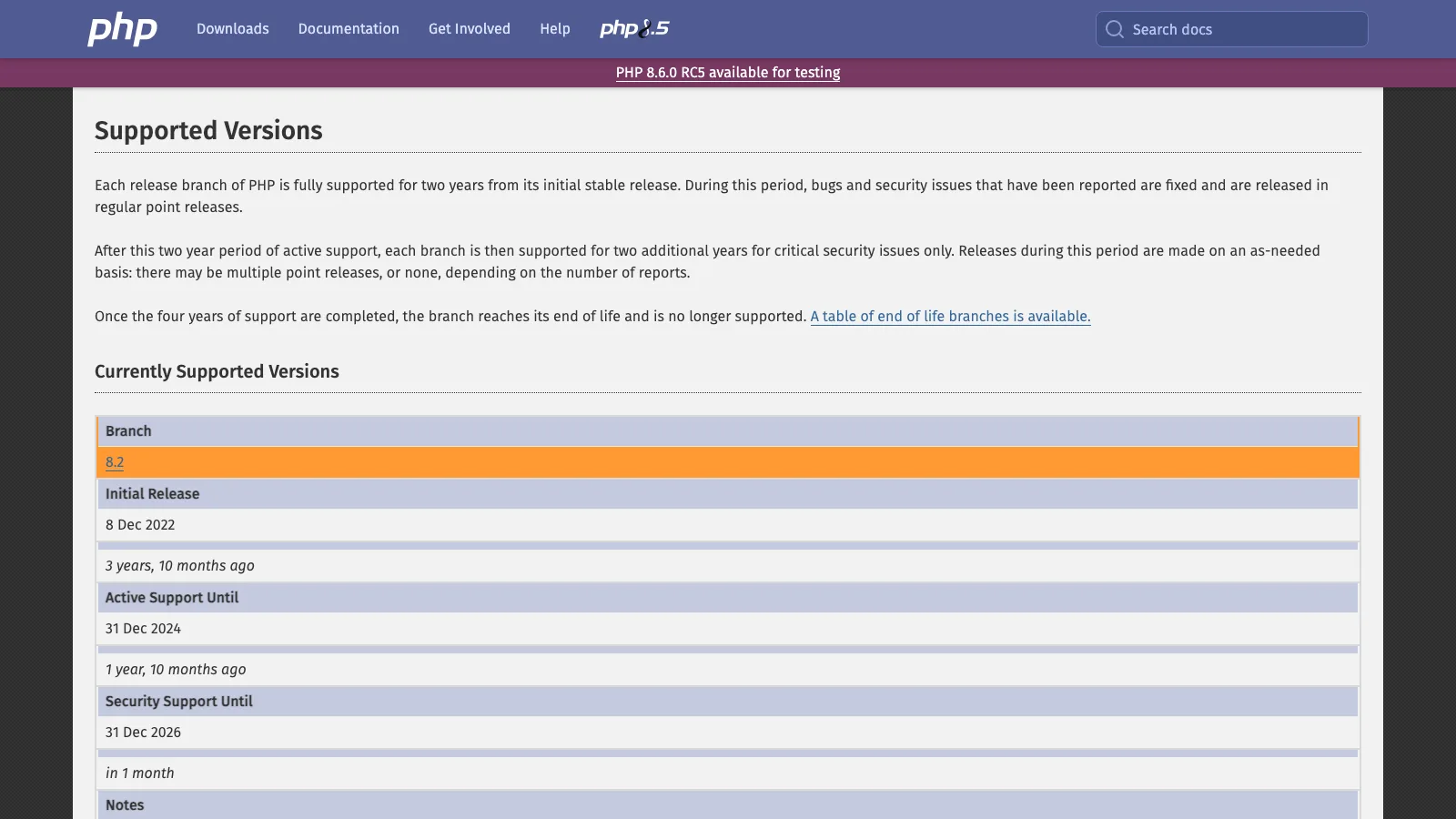
| PHP version | Released | Active support until | Security fixes until |
|---|---|---|---|
| 8.2 | Dec 8, 2022 | Dec 31, 2024 | Dec 31, 2026 |
| 8.3 | Nov 23, 2023 | Dec 31, 2025 | Dec 31, 2027 |
| 8.4 | Nov 21, 2024 | Dec 31, 2026 | Dec 31, 2028 |
| 8.5 | Nov 20, 2025 | Dec 31, 2027 | Dec 31, 2029 |
The WordPress requirements page recommends PHP 8.3 or newer. The same page says WordPress still works on older versions, from PHP 7.4 up, but that those have reached end of life and may expose your site to security vulnerabilities. Working isn't the same as being protected.
You can check all of this at the source, no dashboard needed. I ran the two queries below today.
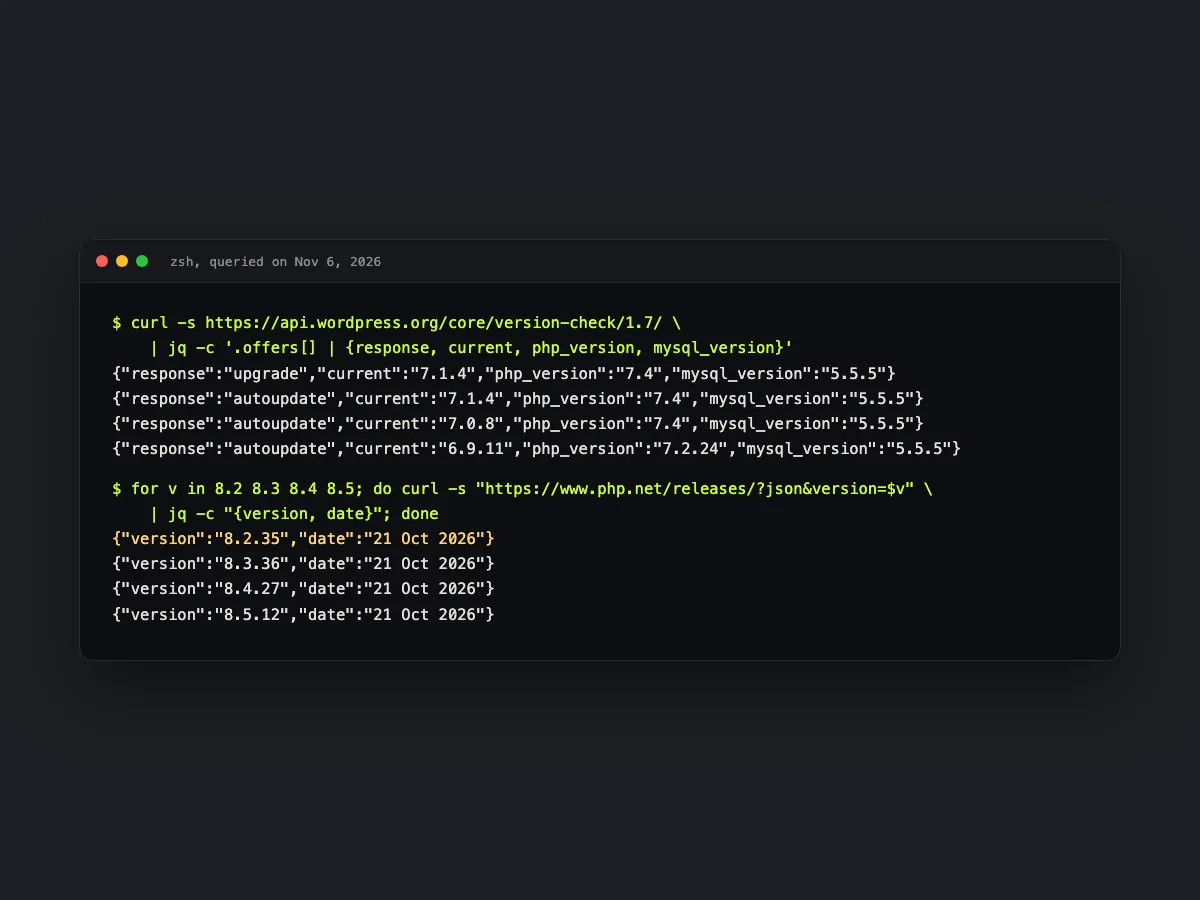
So here's what to do with that. If the site is on 8.2, moving to 8.3 or 8.4 goes into this month's routine, not next year's. If it's on 8.1 or older, it's already getting no security fixes and the switch is urgent.
The routine, item by item
The table below is what I'd call the minimum for a company website on WordPress. An online store needs more, and I'll get to that at the end.
| Task | How often | What "done" looks like | Warning sign |
|---|---|---|---|
| Check the backup | Weekly | The file exists, is about the same size as last week's and lives off the server | A backup that's zero bytes or much smaller |
| Minor updates | Weekly | Plugins, theme and core security releases updated, on a copy first | A plugin with no update in over a year |
| Test what brings leads | Monthly | Form submitted, email received, WhatsApp button opening the right chat | A test message that never arrives |
| Clean up plugins and users | Monthly | Deactivated plugins removed, access for people who left revoked | An admin user nobody recognizes |
| Report | Monthly | What changed, what broke and what's pending, with a reason | A report that only says "all good" |
| Test restore | Quarterly | Backup restored on a separate environment, with the site loading | Nobody remembers the last test |
| PHP version | Yearly, or before the deadline | Site tested and moved to a supported version | PHP 8.2 or older in November 2026 |
A backup nobody tested isn't a backup
Almost every host says it backs up your site. The question that matters is different: has anyone actually restored that backup to see if it comes back whole? The official WordPress docs recommend backing up before any update, and that's the baseline. The step almost everyone skips is the test restore. That one deserves a post of its own, and it's coming.
Update on a copy first
Since WordPress 5.6, new installs come with core auto-updates turned on for both minor and major releases, according to the official docs. Older installs keep the previous behavior, which only auto-updates minor releases and translations. For plugins and themes, auto-updates have been around since 5.5, but they're opt-in, one plugin at a time.
I turn on auto-updates for small, trusted plugins. Anything that touches forms, payments or a page builder goes through a copy of the site first. The reason is simple: auto-updates fix the delay, but they won't tell you the layout broke.
Test what brings in leads
This is the most forgotten item and the one that hurts most. The site can look perfect while the form sends email to an inbox nobody reads, or lands in spam. Once a month, someone fills in the form like a customer would and checks that the message arrived. It takes a few minutes.
Idle plugins and old users
A deactivated plugin is still on the server, and so is its vulnerability. If you don't use it, delete it. Same goes for users: the old agency, the intern from two years ago, the test account. Every extra login is another door.
How to tell the maintenance is actually happening
If someone else looks after the site, you don't need to know PHP to check their work. Four questions, once a month, will do.
Which PHP version is the site on today, and how long is it supported? When was the last tested backup, and where is it stored? Which plugins were updated, and if one was held back, why? Was the form tested this month, and which inbox did the test message land in?
Someone who's really doing the maintenance answers all four in a few minutes, because they already wrote it down. A vague answer like "everything's up to date" is your cue to ask for the report in writing. A good report also shows what didn't work. A month with zero problems logged is rare, and I'd be suspicious of it.
What changes when the site is a store
WooCommerce is a plugin, so everything above counts double. A WooCommerce update touches cart, shipping and payments, and a break there costs sales the same day. For a store, testing on a copy isn't optional, and the monthly test becomes a real purchase with a cheap product or a test coupon. If the store runs a custom-built plugin, it goes into the routine too: someone has to make sure it works on the new PHP version.
In-house or outsourced
You can run this routine in-house. What you can't do is leave it without an owner. The mistake I see most isn't technical, it's about responsibility: the agency delivered the site and left, marketing thinks it's IT's job, IT thinks it's the agency's.
If you outsource, the contract has to spell out what each row of the table covers, with turnaround times. The post on what a 12-month hosting and maintenance contract should include has a ready-made scope template. If the trouble starts earlier, at the hosting level, the comparison of shared hosting, VPS and cloud is worth a read. And if you're thinking about leaving the platform altogether, the guide to migrating a website without losing SEO covers what to protect along the way.
Frequently asked questions
Can I just turn on auto-updates for every plugin and forget about it?
You can, and for small, well-kept plugins it's usually fine. For anything that touches payments, forms or a page builder, I'd rather test on a copy first. Auto-updates fix the delay, but they won't tell you the page broke. Someone still has to look at the site afterwards.
How do I find out which PHP version my site runs on?
In the WordPress dashboard, go to Tools, Site Health, the Info tab, and open the Server section. Your hosting panel usually has a PHP version selector too. If it says 8.2 or older, your deadline is December 31, 2026.
Can switching PHP versions take my site down?
It can, if a plugin or theme relies on something that changed or was removed. That's why you switch on a copy of the site first, with error logging on. Most of the time it goes through without drama. When it doesn't, the culprit is almost always an abandoned plugin, and the fix is replacing it.
Does my host's backup count as a backup?
It counts as one copy, not the only one. If the hosting account gets hacked, suspended or cancelled, the backup stored there goes with it. Keep another copy somewhere the site itself can't delete, and test a restore every now and then.
How much does outsourced WordPress maintenance cost?
It depends on how many plugins you run, whether there's a store, how fast you need a response and how many content updates are included. I'm not going to guess a number here. What you can do is compare proposals against the same scope, and the post on hosting and maintenance contracts has a template for that.
Sources
Checked on November 6, 2026: PHP supported versions, WordPress requirements, PHP compatibility and WordPress versions, upgrading WordPress and automatic updates, plugin and theme auto-updates, WordPress release history, WordPress usage according to W3Techs and Patchstack's State of WordPress Security in 2026 report.
Is your WordPress site piling up updates, stuck on PHP 8.2, or nobody's looking after it? GUSTA offers website hosting and maintenance with a monthly report and turnaround times in the contract. Talk to GUSTA and tell us where the site stands today.
Comments
No comments yet. Be the first to comment.