
The right question is not how much it costs
Almost every server conversation starts with price and ends, months later, at 2am with the site down and nobody sure whose turn it is. The difference between shared hosting, a VPS and the cloud is less about performance and more about one simple question: who takes care of the server when something breaks?
On shared hosting, the hosting company does. On a VPS, you do, or you pay someone to. On a managed cloud platform, the platform does, within its own rules. Everything else follows from that.
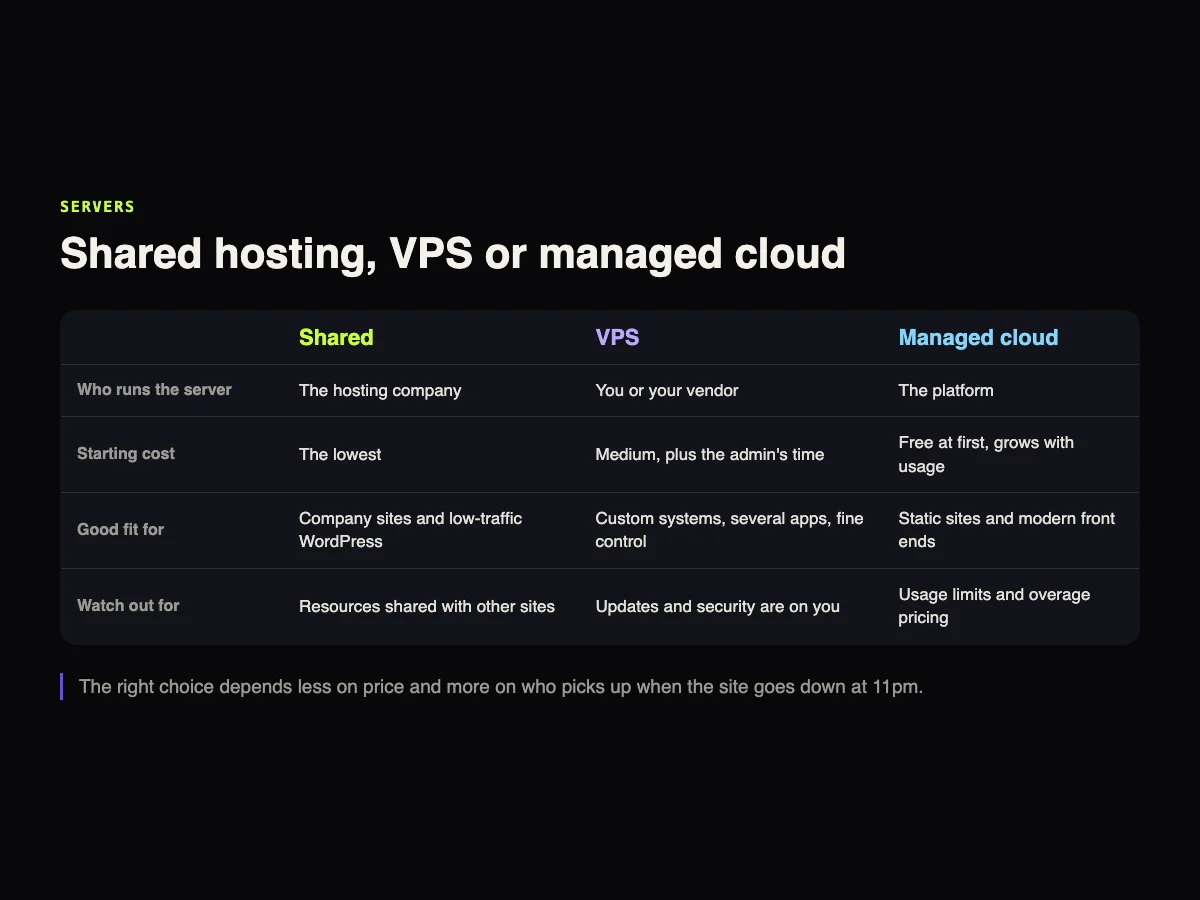
Shared hosting
Several websites share the same server, and the hosting company takes care of the operating system, machine security and server updates. You take care of the site.
It works very well for company websites, blogs and WordPress with moderate traffic. The problem shows up when the site grows, because resources are shared and plans come with processing limits that are not always spelled out on the sales page.
VPS
A virtual server of your own, with reserved resources and full access. It is the route for anyone running a custom system, several applications or configuration that shared hosting will not allow.
A VPS looks cheap because the price leaves out the most expensive part: someone who updates the system, sets up the firewall, watches the logs and responds when the disk fills up. If nobody in the company does that, the cost has to go into the math.
Managed cloud
Platforms that deploy your site straight from the code repository and handle servers, scaling and certificates. For static sites and modern front ends, this is often the calmest option, and many start free.
The catch is usage limits. Traffic, compute time and team seats turn into charges once you pass the plan, and the bill can surprise you in a campaign month.
What each one costs
| Option | Example plan | Promotional price | Renewal |
|---|---|---|---|
| Shared | Hostinger Premium | R$ 10.99 a month, 48-month term | R$ 38.99 a month |
| Shared | Locaweb Go | R$ 9.90 a month, 12-month term | R$ 20.90 a month |
| Shared | KingHost Hospedagem I | R$ 7.99 a month, 24-month term | Not shown on the page |
| VPS | Locaweb VPS 1 GB | R$ 15.90 a month, 24-month term | R$ 25.90 a month |
| VPS | HostGator VPS NVMe 2 | R$ 21.69 a month, 36-month term | Not shown on the page |
| VPS | Hostinger KVM 1 | R$ 29.99 a month, 24-month term | R$ 59.99 a month |
| Cloud VPS | AWS Lightsail | US$ 5 a month | No promotion |
| Cloud VPS | DigitalOcean Basic Droplet | US$ 4 a month | No promotion |
| Managed cloud | Vercel Pro | US$ 20 a month, with usage credit included | Extra usage above the credit |
| Managed cloud | Netlify Pro | US$ 20 a month, with unlimited members | Extra usage above the plan |
Two caveats about this table. Hosting promotions require long terms, and the renewal price, where the page shows it, is two to four times higher. Vercel's free plan is for personal, non-commercial use, so a company website belongs on the paid plan. None of these prices include whoever runs the VPS. Brazilian prices are in reais, as shown to visitors from Brazil.
The path of a visit to your website
When someone opens your site, the request goes through several layers before it reaches the server. Understanding that sequence solves half of the "I changed it and nothing happened" problems.
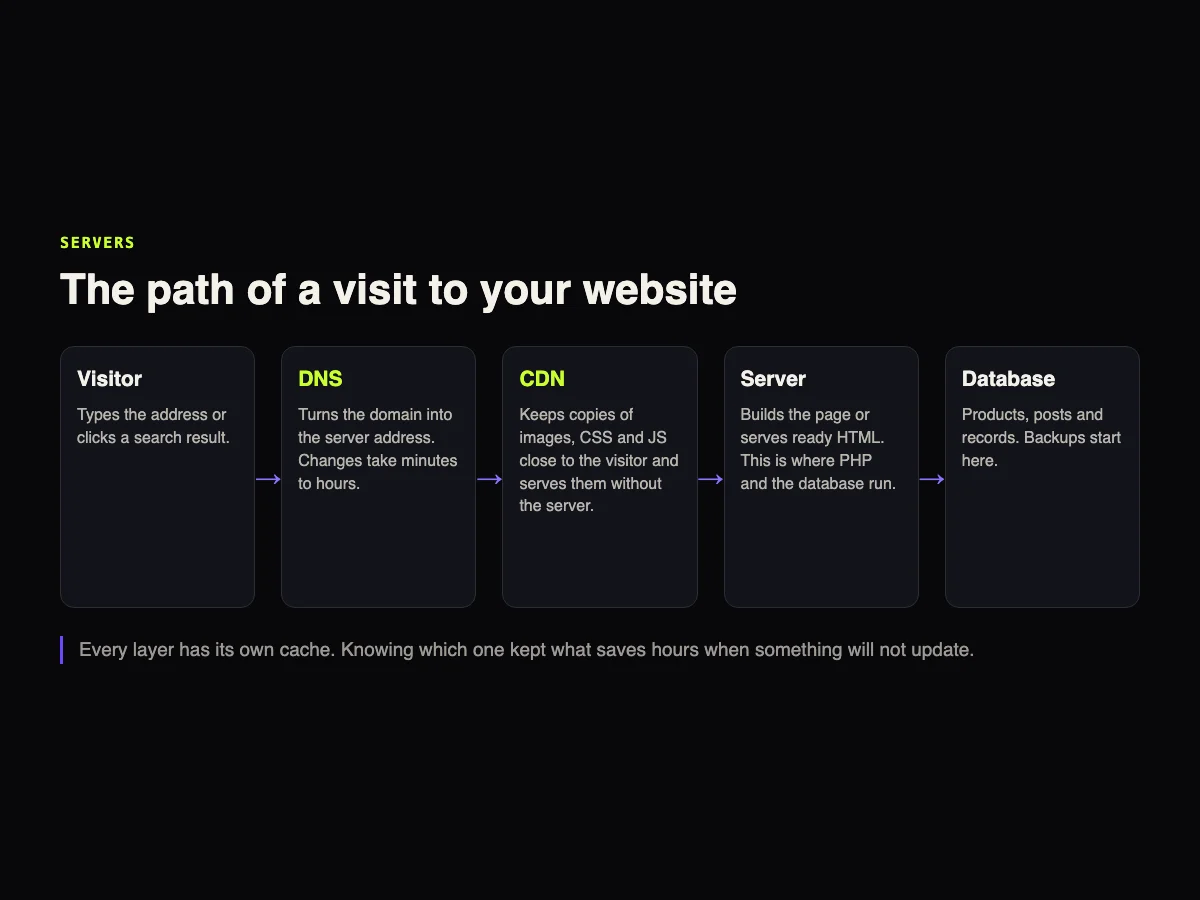
DNS turns the domain into the server address. Changing hosts touches this layer, and the change can take from minutes to a few hours to reach everyone.
The CDN keeps copies of images, CSS and JavaScript on servers close to the visitor. It is what makes a site hosted in one region load fast on the other side of the country. And it is what, when misconfigured, keeps serving an old file after an update.
The server builds the page, running PHP or another language, or serves ready-made HTML. The database holds products, posts and records. That is where backups start.
What the server answers, with real numbers
Below is what the gusta.click server answered in a terminal on September 23, 2026. Three file types with three different cache rules, and the response time measured three times in a row.
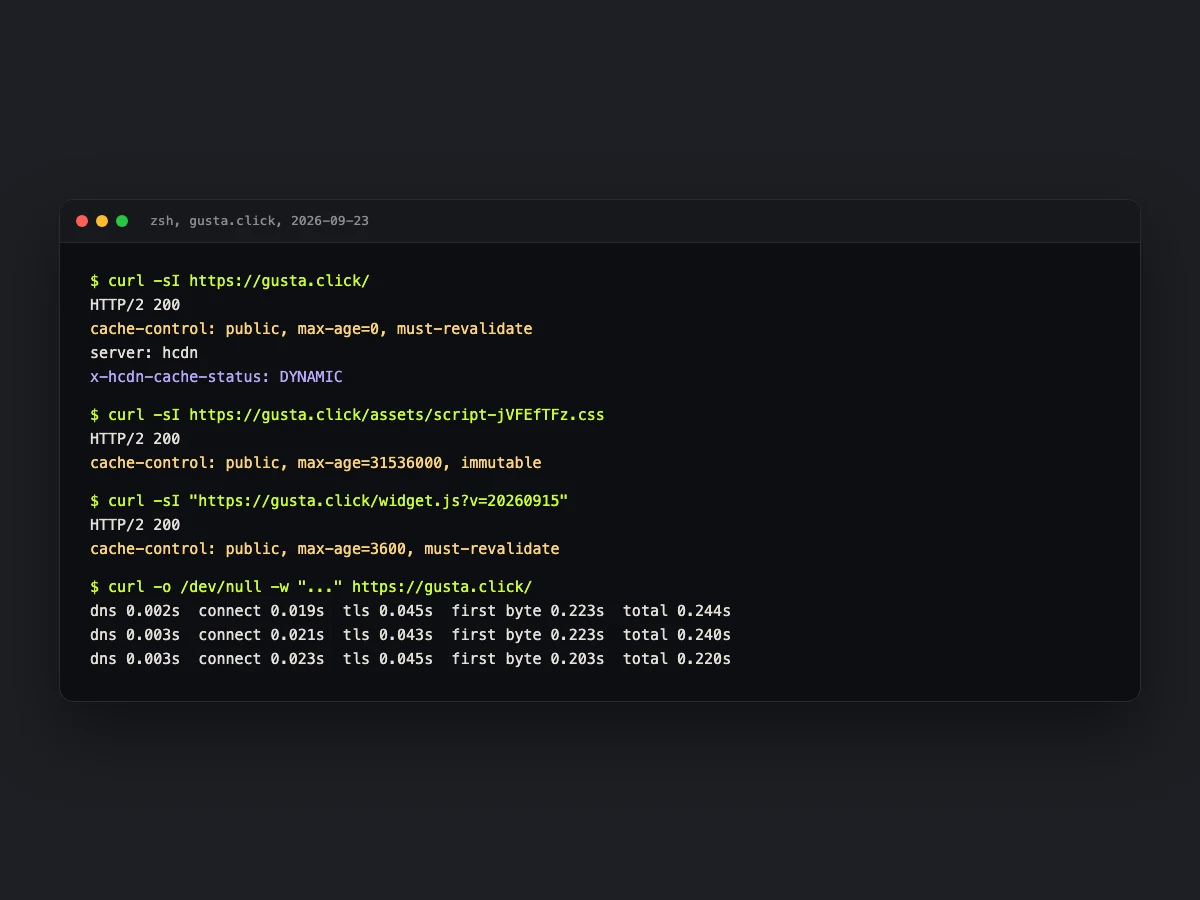
The HTML has max-age=0, because the content changes at the same address and must be checked on every visit. The CSS has a one-year cache and the word immutable, because the file name changes whenever the content does. The widget, which has no version in its name, stays for one hour.
That last rule was learned the hard way. On September 15, after an update, the CDN kept serving the old version of the widget, because the server treated every JavaScript file as immutable. The fix was a version in the URL and a shorter cache for that one file. That kind of detail never shows up on any host's pricing page.
Time to first byte stayed around 0.2 seconds, measured from a connection in Brazil. That is a good number for a static site behind a CDN, and the kind of metric worth tracking month to month.
Signs it is time to move
- The site slows down at peak times and hosting support tells you the plan has hit its limit.
- You need something shared hosting will not allow, like a specific language version or a service that runs all the time.
- More than one system has to live in the same place, such as a website, an API and an admin dashboard.
- The reverse applies too. If nobody runs the VPS and it has gone months without updates, managed hosting is safer than an abandoned server.
PHP versions are maintenance too
A large share of company websites run on WordPress, which runs on PHP. Every PHP version has a date when it stops getting fixes:
| Version | Security fixes until |
|---|---|
| PHP 8.1 | Ended on 2025-12-31 |
| PHP 8.2 | 2026-12-31 |
| PHP 8.3 | 2027-12-31 |
| PHP 8.4 | 2028-12-31 |
| PHP 8.5 | 2029-12-31 |
WordPress recommends PHP 8.3 or newer. Anyone still on 8.2 has until the end of 2026 to move, and a site on 8.1 is already running without security fixes.
Shared hosting usually lets you switch versions in one click, but switching without testing can break an old plugin. That care belongs in your website hosting and maintenance contract.
Backups: three copies, two places, one offsite
The most repeated backup rule still holds: three copies of the data, on two types of storage, with one of them outside your main provider. A backup that lives only on the same server as the site disappears with it. And a backup that has never been restored is a bet, not a backup.
What we use at gusta.click
Our pages are static, generated on every release. Next to them runs a small PHP API with a database that handles meeting bookings and blog comments. Everything ships to a host with a CDN through an automated process that runs on every code change and backs up the database before publishing. For that design, managed hosting does the job, and the money goes where it matters, which is content and ongoing care.
Projects with a custom system, a dashboard and a database need a different architecture. If you are building a site from scratch, our guide to building a business website shows where the server decision fits in the project. For WooCommerce stores, where server and plugins weigh heavily, see also the article on custom WooCommerce plugins.
Frequently asked questions
Is shared hosting safe?
It can be, as long as the site is kept up to date. On shared hosting, server security is the host's job, but site security is yours: CMS, plugins, passwords and backups are still on you.
Is a VPS always faster?
Not necessarily. A poorly configured VPS can be slower than good shared hosting with a CDN. The gain from a VPS is control and reserved resources, and it only shows up if someone knows how to configure it.
Do I need a dedicated server?
For a company website, almost never. A dedicated server makes sense for systems with heavy processing or specific isolation requirements, and it comes with much higher cost and admin work.
Should company email live on the same host as the website?
It can, but keeping them apart is usually safer. With email on its own service, a hosting change or a problem on the web server does not take the company inbox down with it.
Can I switch hosts without taking the site offline?
Yes. The site is copied and tested on the new server before the switch, and only then is DNS pointed there. Lowering the DNS cache time a few days earlier makes the cutover faster.
Sources
Prices and dates checked on official pages on September 23, 2026: php.net, WordPress, Hostinger, Locaweb, HostGator, KingHost, AWS Lightsail, DigitalOcean, Vercel and Netlify.
CTA
Not sure where your company website should live, or inherited a server nobody has updated in months? Talk to GUSTA and we will review the current setup and propose the simplest path that works.
Comments
No comments yet. Be the first to comment.