
The fear is fair
Everyone knows a story about a new website that launched looking great and lost half its Google traffic the following month. The reason is almost always the same, and it's a bit silly: the old URLs stopped existing and nobody told Google where they went.
Website migrations are scary for good reason, but the risk is well understood and it can be controlled. What follows is the step-by-step we use at GUSTA, with Google's own recommendations and examples taken from the gusta.click server.
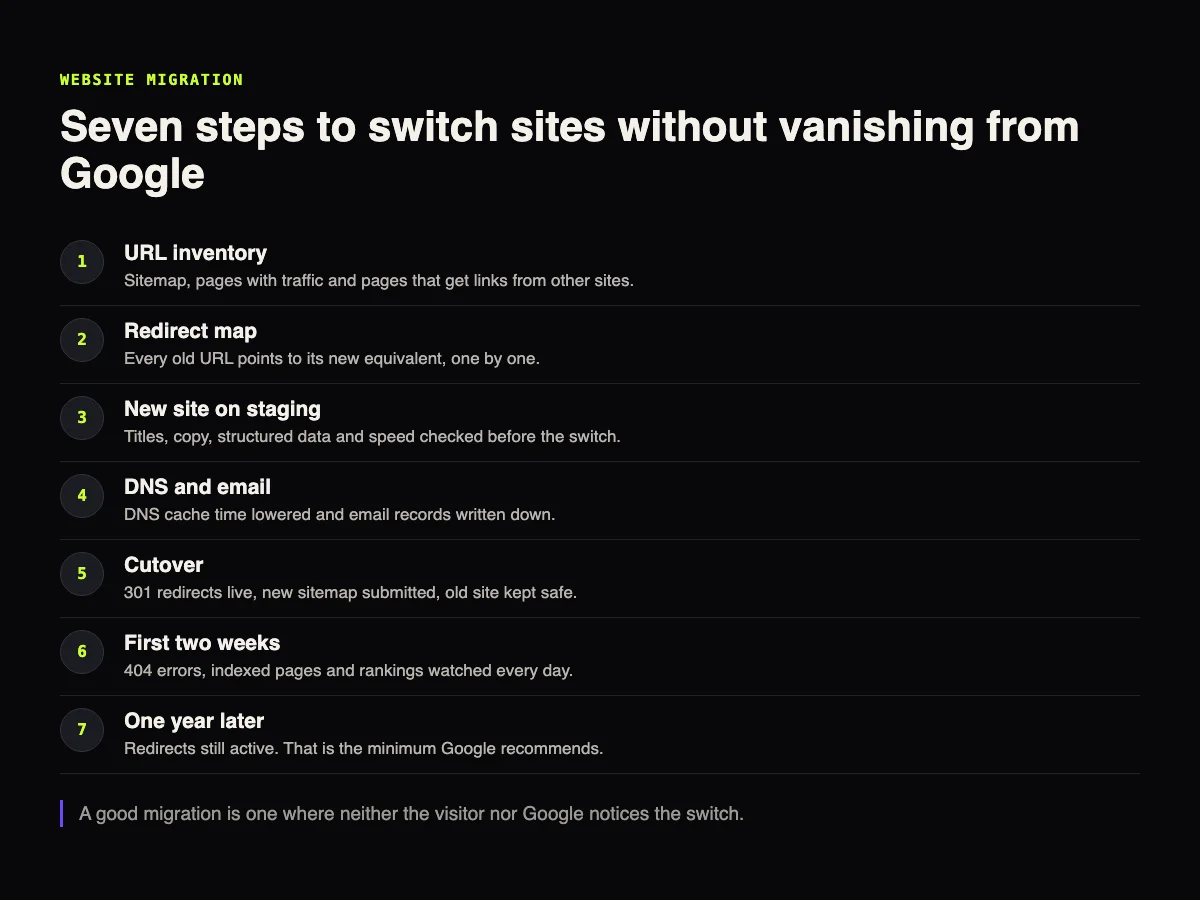
Not every migration is the same
| Type | What changes | SEO risk |
|---|---|---|
| Hosting change | Only the server. URLs stay the same | Low, as long as nothing goes down |
| Platform or layout change | URLs, titles and page structure | Medium. It depends on the redirect map |
| Domain change | Everything moves to another address | High. It calls for the Change of Address tool in Search Console |
Work out which row the project is on before anything else. Plenty of companies treat a platform change as if it were only a visual refresh, and that's when URLs change without anyone noticing.
First of all: the inventory
You can't redirect what you don't know exists. The list of URLs on the current site comes from four places:
- the sitemap, which is the official list;
- the Pages report in Search Console, which shows what Google actually knows;
- Google Analytics, to see which pages get visits;
- the Links report in Search Console, to find the pages other sites point to.
That last list is the most valuable one. An old page with external links carries authority, and it's the first one that needs the right destination.
The redirect map
For every old URL, an equivalent new URL. One by one. Sending everything to the home page looks simpler and is the worst route, because Google treats it as a page that disappeared.
The type of redirect matters. Google's documentation recommends permanent redirects whenever possible, such as 301 and 308, because that's what signals which URL should be treated as the official one.
Ideally each old URL reaches the new one in a single hop. Here is what the gusta.click server answers today in five situations:
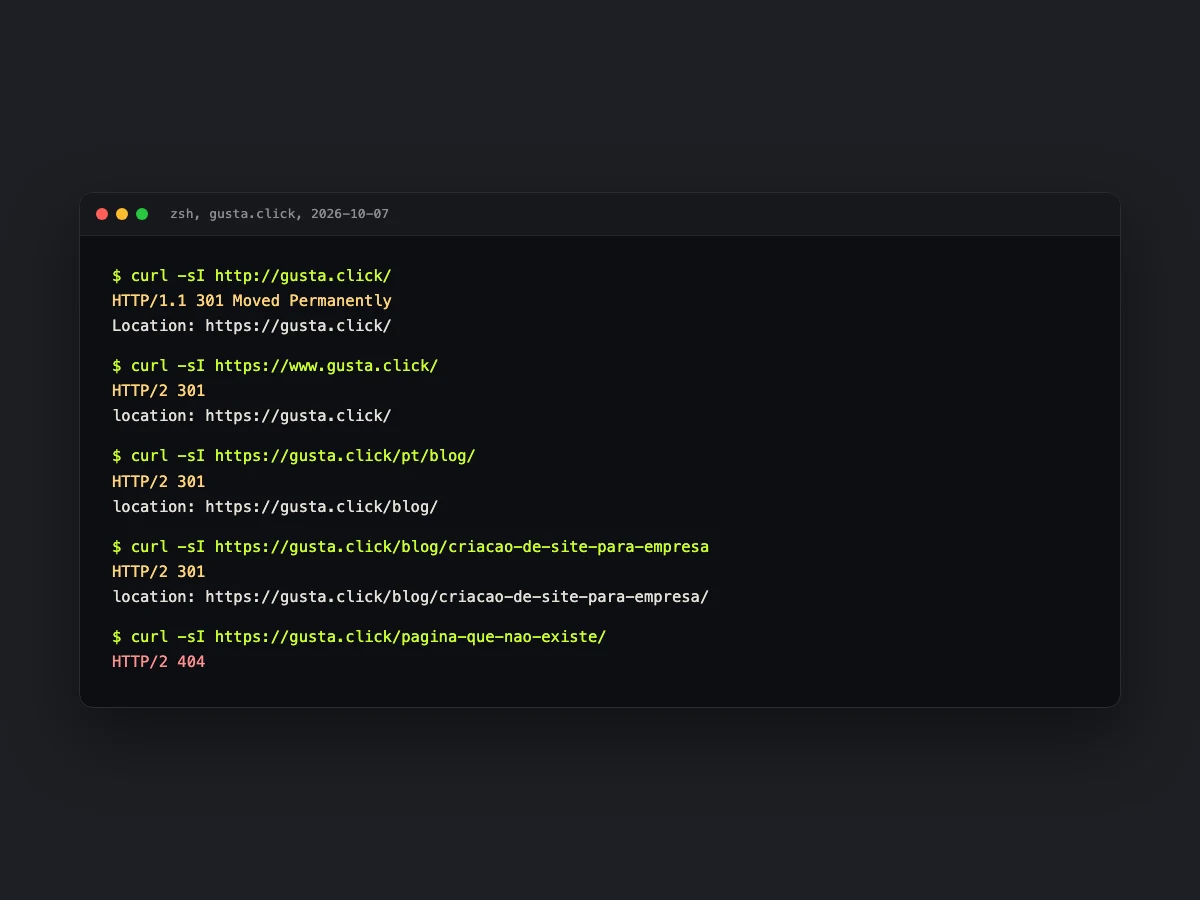
A URL without HTTPS, with www, with the /pt/ prefix the site used in the past, or without the trailing slash: all of them land on the right address with a single 301. And a URL that doesn't exist returns 404 instead of pretending to be the home page.
It wasn't always like that. Until August, the server rules file had a trailing-slash rule that repeated what the server already did on its own. In practice it only added one hop before the 404 on URLs that didn't even exist, and SEO audits kept flagging it. We removed it. A duplicated rule is the most common way to create a chain of two or three redirects, and every extra hop is wasted time for the visitor and for Google.
DNS and email: where a migration breaks what it shouldn't
Changing hosts usually means changing the domain's name servers. That's the moment company email stops working, because the email records lived at the old host and nobody copied them to the new one.
Two precautions solve it. Write down every DNS record before touching anything, especially the email ones. And lower the DNS cache time a few days before the cutover, so the change reaches everyone in minutes rather than hours.
Cutover day
- Publish the new site with redirects already active.
- Test a sample of old URLs, including the ones with the most visits and the most links.
- Submit the new sitemap in Search Console.
- Check the measurement tools. A new site without Analytics is a blind migration.
- Keep the old site. A full backup and, if possible, the old server running for a few days.
If the domain is changing, there's one more step: the Change of Address tool in Search Console. According to Google, it's only needed when a site moves from one domain or subdomain to another.
Afterwards: what to watch, and for how long
Google warns that rankings normally fluctuate during a move. The documentation mentions a few weeks or more for medium-sized sites to start showing up with the new URLs, and longer for large sites.
In the first two weeks, look at three things every day: 404 errors, indexed pages and clicks per page. And keep the redirects. Google's recommendation is to keep them for as long as possible, generally at least one year.

One tip for reading the numbers: don't look at impressions alone. ENE2ESE, a gemstone store and GUSTA client, didn't go through a migration, but its Search Console data makes the point well. Comparing the last six months with the previous six, impressions fell 19% and clicks rose 3.5%, because the click-through rate went from 0.8% to 1%. For the Portuguese query for "gemstones", the average position went from 9.2 to 6.3 and clicks grew 56%. Anyone looking at impressions alone would think the site got worse.
When to bring someone in
A small migration, from one host to another with the same URLs, is something many companies do on their own. When the platform, structure or domain changes, the cost of getting it wrong is months of traffic. If the new site is still on paper, our guide to building a business website shows where the migration fits in the project. To choose the destination, see the comparison of shared hosting, VPS and cloud. And the follow-up after cutover is covered in the guide to website hosting and maintenance. Two things make good use of the same building work: checking website accessibility, which is cheaper to fix during the switch, and understanding how much a business website costs, to know whether the migration is in the price.
Frequently asked questions
Does changing hosts make a site drop on Google?
It shouldn't. If the URLs stay the same and the site doesn't go offline, Google doesn't even notice the change. The risk appears when the migration changes URLs or takes the site down for hours.
How long do I need to keep redirects?
Google recommends keeping them for as long as possible, generally at least one year. For people arriving through an old link, keeping them forever is worth it.
Can I redirect all old pages to the home page?
You can, but you lose almost everything. Google tends to treat that kind of mass redirect as a page that no longer exists, and the authority of the old pages isn't passed on.
How long does Google take to recognise the new site?
According to the documentation, a few weeks or more for medium-sized sites, and longer for large ones. Ranking fluctuation in that period is expected.
Is company email at risk during a migration?
Yes, when the change involves the domain's name servers. Email records have to be copied to the new DNS before the cutover.
Sources
Recommendations checked on October 7, 2026: Google Search Central, site moves with URL changes and Google Search Central, redirects.
CTA
About to change hosting, platform or domain? Talk to GUSTA before the cutover. We build the inventory and the redirect map, and we watch Search Console in the weeks that follow.
Comments
No comments yet. Be the first to comment.