
A score of 100 doesn't mean accessible
Lighthouse gives the gusta.click blog pages 100 for accessibility. I like the number, and it doesn't prove the site is accessible. The report itself says so, right below the score: automated detection only finds part of the problems.
Website accessibility is a legal requirement in Brazil, for government and for companies. This article puts together what the law asks for, which standard to follow, six tests any company can run without hiring anyone and where the automated tool stops. The law is Brazilian, but the standard and the tests are the same anywhere.
What the law says
The Brazilian Inclusion Law, from 2015, deals with websites in article 63. In a free translation: accessibility is mandatory on websites maintained by companies with headquarters or commercial representation in the country, or by government bodies, for use by people with disabilities, following the accessibility best practices and guidelines adopted internationally.
Two details go unnoticed. The obligation applies to companies, not only to public bodies. And the first paragraph of the same article asks for something very concrete: websites must display an accessibility symbol in a prominent place.
The federal government has one more layer. eMAG, the e-government accessibility model, is at version 3.1, and a 2007 ordinance made it mandatory on government sites and portals. Anyone answering a public tender needs to know that document before sending a price.
Which standard to follow
The law refers to best practices and guidelines adopted internationally. In practice, that points to WCAG, from the W3C. Version 2.2 became a recommendation on October 5, 2023 and has 86 success criteria at three levels:
| Level | Criteria | In practice |
|---|---|---|
| A | 31 | The minimum. Without it, some people can't use the site |
| AA | 24 | The most common target in standards and contracts |
| AAA | 31 | For specific cases. Rarely required for an entire site |
Brazil got its own standard in 2025. ABNT NBR 17225, first edition dated March 11, 2025, sets accessibility requirements for web content and applications.
A contract doesn't need to cite all three. It needs to cite one, with the level, and say how it will be checked.
Six tests you can run today
None of them needs a paid tool. Half an hour on the company website already shows a lot.
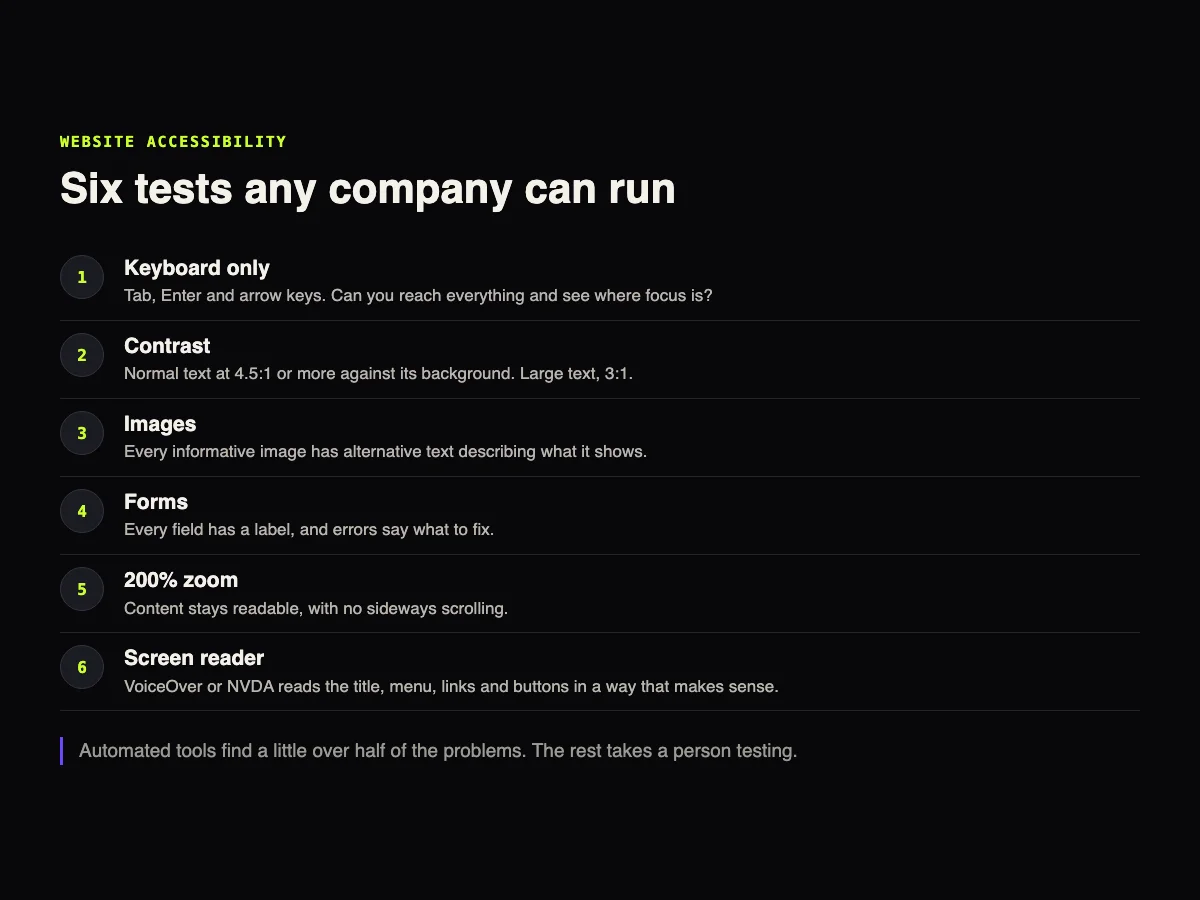
1. Keyboard only. Put the mouse away. Tab moves forward, Shift+Tab moves back, Enter activates. Can you reach the menu, the buttons and the form? Can you see where you are?
2. Contrast. Normal text needs at least 4.5:1 against the background. Large text, 3:1. The browser inspector shows that ratio when you click the text color.
3. Images. Every image that carries information needs alternative text saying what it shows. "Image 1" or the file name doesn't count.
4. Forms. Each field has a label, and the error message says what to fix. "Invalid field" in red, without saying which one, fails.
5. 200% zoom. Increase the browser zoom. The text has to stay readable, with no sideways scrolling and no button disappearing.
6. Screen reader. VoiceOver on Mac and iPhone, NVDA on Windows, TalkBack on Android. Close your eyes and try to reach the contact page. It's the most uncomfortable test, and the one that teaches the most.
Two errors of our own, with numbers
In September, Lighthouse started giving 96 for accessibility on every post of this blog. It came down to two small pieces of text.
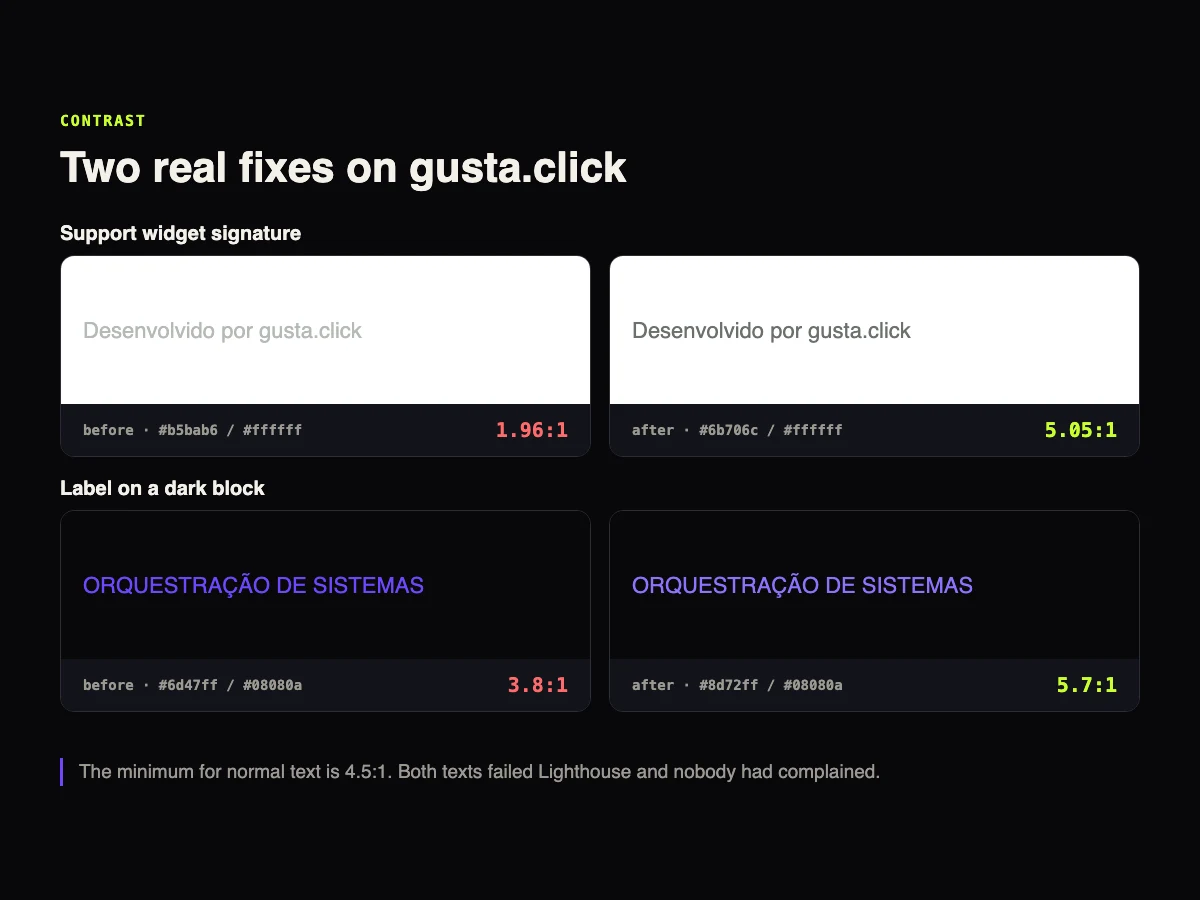
The signature of the chat widget, light grey on white, had a contrast of 1.96:1. A purple label on a dark background had 3.8:1. Both below the minimum.
The fix was changing two colors. The signature went to 5.05:1 and the label to 5.7:1. It took minutes. What took time was someone noticing, because nobody had complained. That's the underlying problem: people who can't read a text rarely tell you. They just leave.
Where the automated tool stops
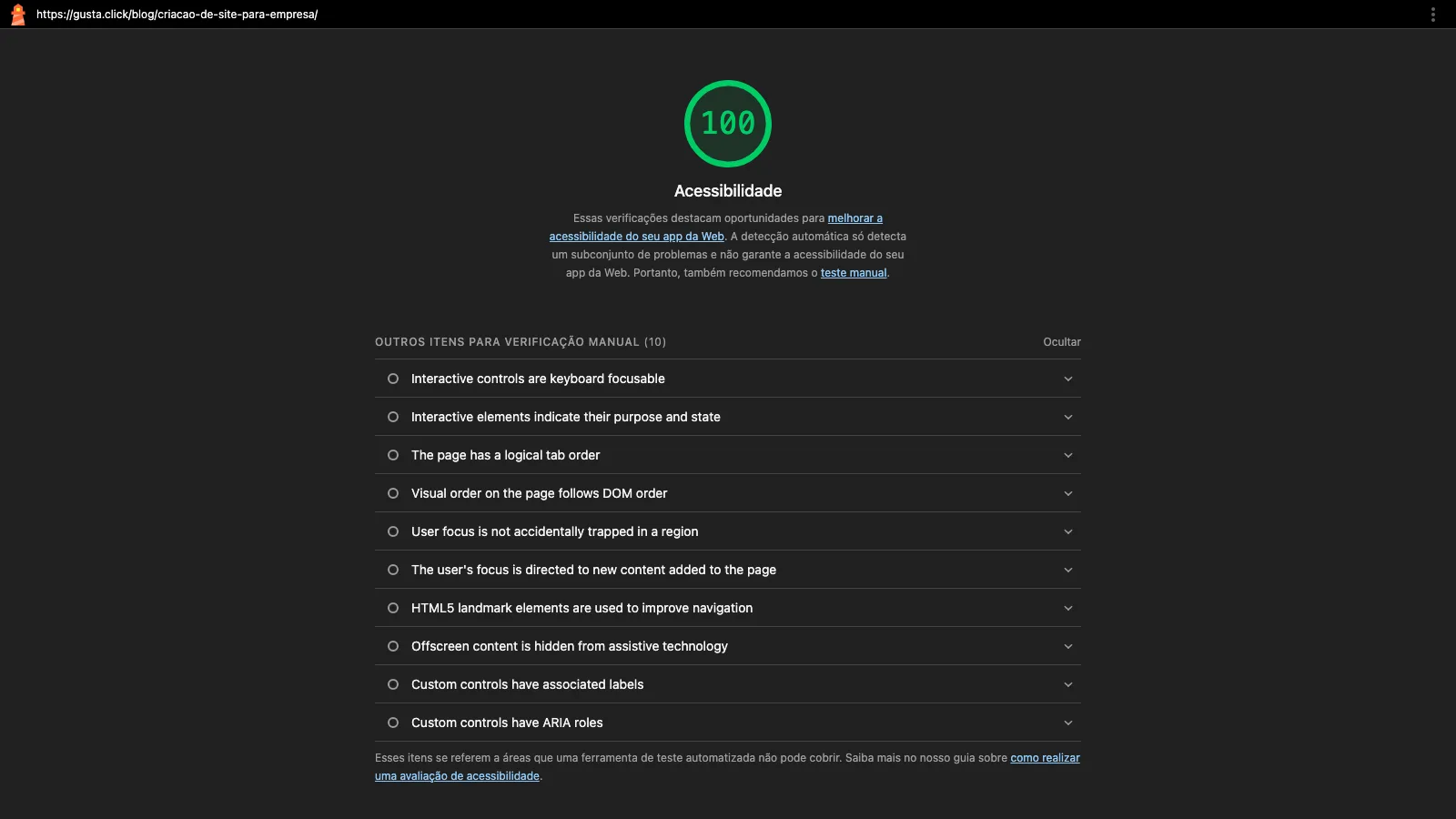
The report above is from a gusta.click page. A score of 100, with 27 audits passed. Underneath, Lighthouse itself lists 10 items it can't check and asks for manual verification. Among them are focus order, focus trapped in a region of the page and hidden content that a screen reader still reads.
Deque, the company that maintains the testing engine Lighthouse uses, analysed real audits and found that 57.38% of issues were identified by automated tests. That leaves more than 40% for people.
In practice, the routine that works has three layers. An automated tool every month, because it catches regressions cheaply. Manual testing at every major layout change. And, when the contract requires conformance, evaluation with people with disabilities using the site.
What to write into a contract or tender
Four lines settle most of the arguments:
- Standard and level. For example, WCAG 2.2 level AA. For the Brazilian federal government, eMAG.
- How it will be checked. A monthly automated report and manual testing on which pages.
- Time to fix. How many days to correct whatever shows up.
- Who answers for new content. An image without a description published by the company's own team fails too.
Those items fit in the website hosting and maintenance contract, next to backups and updates. On a new site, accessibility goes into the design, as shown in the guide to building a business website. And check whether it's in the price, because it's one of the three items most often left out, as I explain in how much a business website costs. If the site is about to change platforms, the switch is the best time to fix everything at once, and the script is in website migration without losing SEO.
Frequently asked questions
Is website accessibility mandatory for private companies in Brazil?
Yes. Article 63 of the Brazilian Inclusion Law covers websites maintained by companies with headquarters or commercial representation in the country, as well as government bodies.
Does a Lighthouse score of 100 mean the site is accessible?
No. It means the page passed the automated checks. The report itself lists items that need manual testing.
Which WCAG level should I require?
Level AA is the most common target in standards and contracts. AAA is usually applied to specific cases, not to an entire site.
Does an accessibility plugin or widget solve it?
Not on its own. Those tools help with display adjustments, but they don't fix an image without a description, a form without labels or broken keyboard navigation.
What is NBR 17225?
It's the ABNT standard, from the Brazilian standards body, with accessibility requirements for web content and applications. The first edition is dated March 11, 2025.
Sources
Laws, standards and data checked on October 7, 2026: Law 13,146/2015, WCAG 2.2, ABNT NBR 17225, eMAG and Deque report.
CTA
Want to know how your company website does on the six tests? Talk to GUSTA. We run the evaluation, show what the automated tool missed and deliver the list of fixes by priority.
Comments
No comments yet. Be the first to comment.