
What custom AI means, without the hype
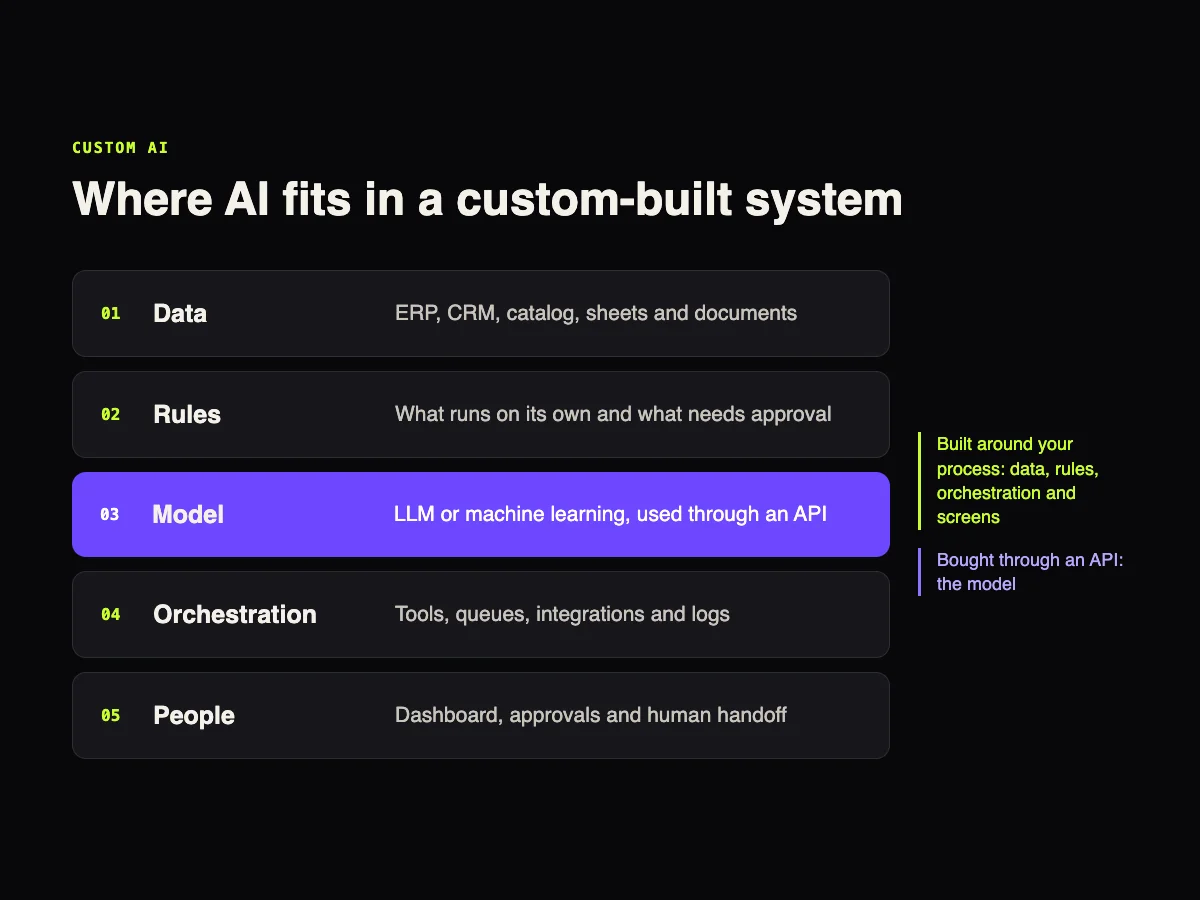
A custom AI solution is software built around one specific company process, where a language model or a machine learning model is one of the parts, not the whole product. In almost every project the model is bought through an API. What actually gets built is the path from data to decision: where the information comes from, which rule applies, who approves and where the result shows up.
This article is for anyone facing the question "do we buy a tool or build our own?". We answer that question often at GUSTA, and the honest answer is frequently "neither, integrate what you already have".
What custom does not mean
It is not training a model from scratch. That is expensive, needs a lot of labeled data and rarely pays off outside tech companies. Fine-tuning shows up now and then, but most problems are solved with a good off-the-shelf model and well-built context.
It is not just a well-written prompt. The prompt is a small part. The system has to fetch fresh data, apply business rules, log what happened and let a person step in when needed.
It is not always a chatbot. Many of the most useful projects have no conversation at all. A routine that reads orders, flags exceptions and only calls someone when something is off is custom AI too.
Three paths: buy, integrate or build
| Path | When it makes sense | What can go wrong |
|---|---|---|
| Subscribe to a ready-made tool | The process looks like everyone else's: basic support, transcription, copywriting, meeting notes | Data lives elsewhere, limited customization and costs that grow with usage |
| Integrate AI into current systems | The data already sits in the ERP, CRM or store, and a smart step is missing between them | Integrations that break when a vendor changes its API |
| Build your own system | The process is what sets the company apart, or no tool does what it requires | Upfront cost, dependence on a technical team and ongoing maintenance |
The middle path is the most underrated. A company that already runs an ERP, a CRM and an online store rarely needs a brand new system. It needs those systems to talk, with an AI layer at the points where someone copies, pastes and decides by hand today. The guide on integrating ecommerce, ERP and marketplaces shows how that foundation is usually put together.
Signs that building is worth it
- The process has rules that only exist in your company. Contract-based pricing, approval tiers, industry regulations.
- The data is spread across three or more systems and no ready-made tool connects all of them.
- Volume is high. When per-user or per-use pricing costs more than running a system, the math flips. The article on how much an AI chatbot costs shows how that pricing scales.
- You need control. Where data is stored, who accessed it, which rule produced each decision.
- The solution would solve the same problem for other companies. That is where the SaaS conversation starts.
And the signs that it is not time yet: the company wants "to have AI" but cannot name the process; volume is low; nobody in operations will use or review what the system produces.
When a system becomes a SaaS
An internal system serves one company. A SaaS serves many at once, and that changes the architecture from day one. Nola AI, the sales assistant GUSTA builds and runs, is a good example of what goes on that list.
Isolation between customers. Each store has its own catalog, history and settings, and no data crosses from one to another. In Nola, the dashboard, the chat and the API run separately, and every query carries the store's identifier.
Usage limits and billing. The AI model's cost is baked into the plan price, so you have to measure usage per customer, set limits and decide what happens when they run out. On Shopify, billing also has to go through the platform's own billing system.
Permissions. Store owners, support agents and agencies do not see the same things. Nola has six permissions that can be set per user.
Onboarding without a meeting. Install tutorials per platform, flow templates per niche and automated emails get customers to their first result on their own.
Data the model is not allowed to invent. Price and stock questions do not go through similar-text search. They become a real query against the catalog. That kind of decision, mixing a language model with a traditional database, is what separates a prototype from a product people can trust.
Custom AI examples beyond chatbots
- Order and ticket triage. The system reads, classifies, pulls out the key data and routes it in the CRM or ERP. A person only handles exceptions.
- Catalog enrichment. Supplier spreadsheets become standardized descriptions, attributes and categories, with human review before publishing.
- Document processing. Invoices, contracts and forms fill in the system without typing, with a record of where each field came from.
- Demand forecasting. Here the model is not a language model at all. Classic machine learning on sales history usually predicts stock better.
- Internal search. The team asks in plain language and gets the answer with a link to the source document.
- Natural language reporting. The question becomes a database query, and the number comes from real data, not from the model's guess.
In ecommerce, custom AI and machine learning models usually come up alongside the decision to move off a ready-made platform. The article on custom ecommerce with AI covers that case, and the one on ecommerce automation with AI lists the processes worth automating first.
How to start without betting big
- Pick a process with measured pain. Hours per week, errors per month, late orders. Without a starting number, you cannot tell whether the project worked.
- Map data and rules. Where each piece of information comes from, who decides what and what happens with exceptions.
- Decide what the AI does alone and what needs approval. Starting with human approval on everything and loosening it as trust grows is safer than the other way around.
- Run a short pilot with a small group of users and compare it with the old process.
- Only then choose the format: keep it as an internal tool, extend it to other teams or turn it into a product.
In GUSTA's case studies this design shows up in different ways. At ENE2ESE, the chatbot built into the store has clear criteria for when to hand over to a person. At Vixting, the website and conversational support are run as parts of the same operation.
How much it costs and how long it takes
There is no list price for a custom system, but the factors that drive it are always the same:
- how many systems need to be integrated, and how good each one's API is;
- the state of the data: a messy catalog costs more than any model;
- the number of screens and user roles;
- security, audit and privacy requirements;
- whether the system serves one company or many, like a SaaS;
- AI model usage, which is usually the smallest line in the budget.
On that last point, our breakdown of the GPT-5.6 models shows how much the model choice changes running costs.
Frequently asked questions
Does custom AI mean training our own model?
Almost never. In most projects the model is bought through an API, and development focuses on data, rules, integrations and screens. Training from scratch only makes sense with a lot of exclusive data and a problem no existing model solves.
Is our company data used to train OpenAI's models?
Under OpenAI's policy, data sent through the API is not used to train its models by default. Even so, the project should define which data leaves the company and mask sensitive information where possible.
Can we start with a ready-made tool and migrate later?
Yes, and it is often the best route. The ready-made tool helps you learn what the process really needs. Just make sure your data can be exported when it is time to move.
What is the difference between custom AI and automation?
Traditional automation follows fixed rules. AI comes in when the input is unpredictable, like free text, a document that looks different every time or a customer question. In practice the best systems combine both.
Who maintains the system after launch?
Someone has to. APIs change, new models come out and the company's process evolves. At GUSTA, projects continue with ongoing support, as in the ENE2ESE and Vixting case studies.
CTA
Have a process no ready-made tool handles well? Talk to GUSTA and we will help you decide whether to buy, integrate or build. If the challenge is selling more in an online store, meet Nola AI.
Comments
No comments yet. Be the first to comment.